Offers API Docs (1.0)
Download OpenAPI specification:Download
Swagger UI - Interactive API documentation using Swagger UI.
The Offers API is crafted for dealers and partners seeking to enhance their leasing operations for bicycles and accessories. By integrating this API, you can seamlessly align your workflows, minimize manual effort, reduce errors, and expedite the process through efficient status information updates. The API offers a comprehensive suite of functionalities:
Submit New Lease Offers: Simplify the creation and submission of offers for bicycles and accessories, enabling swift and effective leasing management.
Track Offer Status: Continuously monitor the status of submitted offers throughout the approval process to ensure transparency and informed decision-making.
Query Existing Offers: Utilize advanced filter options to efficiently access details of existing offers, streamlining data retrieval and management.
Access Leasable Accessories Catalog: Retrieve the catalog of accessories available for lease, enhancing the value and customization of bicycle offers.
These capabilities are designed to optimize the leasing process and enhance business operations through seamless API integration. This overview provides foundational insights into constructing offers using key components, thus ensuring seamless integration into your leasing workflow. The following section of this document will provide a detailed description of each component and how to leverage them effectively.
We are committed to continuously improving everything related to offers and refining the processes our partners utilize. Your feedback is invaluable to us, and we welcome you to get in touch if you're interested in partnering or have suggestions to make our offerings even better.
Offer Overview
In the Offers API, the main offer object comprises several key components integral to creating a complete and leasable offer. Here’s a brief summary of its main parts:
- Product (Bike):
- Bidex Code: Mandatory identifier for the bicycle, crucial for standardized classification.
- Details: Includes various descriptive attributes such as brand name, model name, year, color, size, drive manufacturer, battery capacity, and pricing information. These fields provide essential characteristics and are customizable text entries.
- Accessories:
- Bidex Code: Ensures identification and checks for leaseability.
- Accessory Details: Includes attributes like brand name, model name, and pricing details.
- Additional Fields:
- Shipping Cost: Specifies the net cost of shipping the offer.
- Installation Cost: Details the net cost associated with installation.
- Delivery Date: Indicates expected date and time for delivery.
- Notes: Contains any special instructions or additional information associated with the offer.
This overview provides a foundational understanding of how to construct an offer using the essential components, ensuring seamless integration into the leasing workflow.
Offers submitted via this API are processed asynchronously, ensuring efficient background handling. Initially, upon submission, the service accepts the offer, returning an HTTP status code 202 Accepted. It's crucial to note that this does not confirm successful processing; subsequent background processes may identify issues such as missing or invalid data.
After submission, use the GET /offers endpoint to regularly check offer status, ensuring it progresses as expected.
Pay attention to any status changes which indicate requirements for further action.
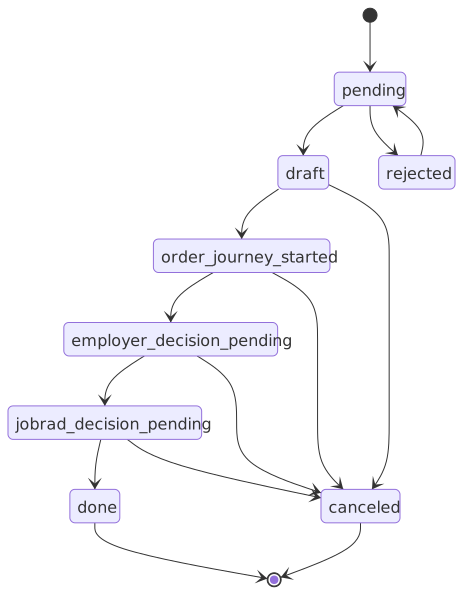
This section details potential statuses within the offer lifecycle and relevant developer actions:
pending: Awaiting acceptance by JobRad, indicating the initial submission state. [Initial status]draft: The offer is accepted, yet to undergo further processing by JobRad.order_journey_started: The offer has been integrated into an order, with the process now active. At this stage, no modifications are allowed.employer_decision_pending: Awaiting employer approval, requiring developers to monitor and manage response setups.jobrad_decision_pending: Awaiting JobRad's approval, similar to employer approval considerations.done: The offer is complete, requiring no further actions. [Final status]canceled: The offer is canceled; no subsequent processing occurs. [Final status]rejected: The offer is deemed invalid and rejected. Ensure to check theerrorsfield for rejection reasons. Correct the issues, then resubmit for processing.
Example Response
The following is a typical response structure containing the "status" object. The "status" object provides detailed insight into the lifecycle and processing of offers and is returned in both the POST endpoint when submitting an offer and in all GET endpoints within the "data" object. This allows for tracking the current status of each offer.
{
  "status": {
    "current": {
        "code": "pending",
        "message": "The offer is currently processed by Jobrad.",
        "translations": {
          "de": "Das Angebot wird aktuell von JobRad bearbeitet."
        }
    },
    "nextSteps": [
        {
          "code": "draft",
          "message": "The offer is waiting for customer approval.",
          "translations": {
              "de": "Das Angebot wartet auf Zustimmung durch den Arbeitgeber."
          }
        },
        {
          "code": "canceled",
          "message": "The offer is cancelled.",
          "translations": {
              "de": "Das Angebot wurde storniert."
          }
        },
        {
          "code": "rejected",
          "message": "The offer has been rejected by Jobrad.",
          "translations": {
              "de": "Das Angebot wurde von Jobrad abgelehnt."
          }
        }
    ],
    "errors": [
        {
          "code": "INTERNAL_SERVER_ERROR",
          "message": "An internal error occurred. Please try again later.",
          "translations": {
              "de": "Es ist ein interner Fehler aufgetreten. Versuchen Sie es zu einem späteren Zeitpunkt erneut."
          }
        }
    ],
    "infos": [
        {
          "code": "EXTERNAL_ID_ALREADY_USED",
          "field": "externalOfferId",
          "message": "The external ID XYZ is already associated with other offers.",
          "translations": {
              "de": "Die externalId XYZ ist bereits mit anderen Angeboten verknüpft."
          }
        }
    ]
  }
}
Explanation of the Status Object:
current: Represents the current status of the offer, providing immediate information on where the offer stands in the processing lifecycle.nextSteps: Lists potential status transitions and actions that could be taken next. This helps in forecasting the workflow progression and preparing for upcoming stages.errors: Indicates issues that require action. These errors are critical and signify problems that must be addressed to proceed with the offer processing.infos: Comprises informational messages that highlight changes or updates, such as normalization of text. These should be presented to the user but generally do not necessitate immediate action.
By understanding these elements, developers can efficiently manage offers, anticipate necessary actions, and ensure both accuracy and compliance in offer handling.
The diagram below illustrates the various statuses an offer can transition through during its lifecycle.
The externalOfferId is a identifier assigned by the dealer for an offer.
It needs to be unique for a dealer.
Typically, it corresponds to the dealer's offer number.
Bidex Codes are integral to identifying bicycles and accessories within this API, facilitating streamlined classification and data exchange. These standardized six-digit codes promote efficient communication between suppliers and retailers.
Structure of Bidex Codes:
First two digits: Indicate the product category (e.g., bicycles, accessories).
Next two digits: Represent the main product group within the category.
Final two digits: Define the sub-product group.
Example Breakdown:
Consider the Bidex Code 103030:
10– Product category: Bicycles30– Main group: City/Urban30– Sub group: Touring
Thus, 103030 signifies a City Touring Bike.
For comprehensive details, refer to the Bidex website.
Internal Remapping of Bidex Codes for Leasable Accessories
To streamline categorization, some Bidex Codes undergo internal remapping to
a higher-level main group. For instance, codes such as 202120, 202130,
202140, and 202150 are remapped to 202100, as they represent gear
system upgrades in JobRad's context.
Key Actions for Developers:
When submitting an offer with a code like
202120, expect the offer retrieval process to return the remapped code202100.Use the GET /offers/accessory endpoint to:
- Verify Leaseability: Check whether an accessory's Bidex code is leasable, thus ensuring it can be included in a bike offer. If the code is present, the accessory is leasable; if not, it should not be part of the leasing offer to avoid rejection.
- Optimize Processes: Integrate this endpoint early in your workflow to swiftly identify leaseable accessories, maintaining operational efficiency and reducing errors in offer submissions.
This systematic approach to using Bidex Codes enhances data consistency and facilitates seamless integration into the leasing process.
All interactions with the Offers API require authentication using the OAuth 2.0 protocol.
To securely access protected endpoints, you must first obtain a valid access token from our authorization server. The process for retrieving and using these tokens is outlined in detail in our OAuth Authentication Guide.
Following these guidelines ensures that all requests are properly authenticated and authorized — providing secure, reliable access to the JobRad API.
Get an offer by ID
Retrieve a specific offer by its UUID.
- The offer is returned in the status it was last processed. As a result, the offer might have changed since it was last created or modified..
Authorizations:
path Parameters
| id required | string <uuid> Example: a0ab7953-ca09-4bc6-8fee-5b003fccbb6d UUID of the offer to retrieve |
Responses
Response samples
- 200
- 401
- 403
- 404
- 500
{- "data": {
- "id": "978fe89a-da63-4221-a8be-bbb743ef07bc",
- "externalOfferId": "external-id-123",
- "offerNumber": "FHA-000123",
- "orderNumber": "LAU-000105",
- "customerName": "Max Mustermann",
- "customerEmail": "max.mustermann@example.com",
- "product": {
- "bidexCode": 123040,
- "brandName": "Gudereit",
- "modelName": "Model X",
- "modelYear": 2023,
- "color": "Black",
- "size": "L",
- "driveManufacturer": "Bosch",
- "batteryCapacity": 500,
- "priceGross": 2900.99,
- "listPriceGross": 2999.99
}, - "accessory": [
- {
- "bidexCode": 301520,
- "brandName": "ABUS",
- "modelName": "Bordo Granit XPlus 6500",
- "priceGross": 99.99,
- "listPriceGross": 119.99
}
], - "withShipping": true,
- "shippingCostGross": 49.99,
- "installationCostGross": 29.99,
- "deliveryDate": "2030-12-01T00:00:00.000Z",
- "notes": "Please call before delivery",
- "createdAt": "2030-12-01T00:00:00.000Z",
- "lastUpdateAt": "2030-12-01T00:00:00.000Z",
- "status": {
- "current": {
- "code": "pending",
- "message": "The offer is awaiting acceptance by JobRad",
- "translations": {
- "de": "JobRad prüft gerade die Angaben Ihres Angebots."
}
}, - "nextSteps": [
- {
- "code": "draft",
- "message": "The offer is accepted, but not yet processed by JobRad.",
- "translations": {
- "de": "Der bzw. die Mitarbeitende hat jetzt Ihr Angebot erhalten."
}
}
], - "errors": [ ],
- "infos": [
- {
- "code": "info",
- "message": "Bike brand name 'CUBE' mapped to 'Cube'",
- "field": "product.brandName",
- "translations": {
- "de": "Bike-Brandname 'CUBE' wurde auf 'Cube' umgemappt."
}
}
]
}, - "links": {
}
}, - "meta": {
- "timestamp": "2024-12-04T14:05:56.222858Z"
}
}Update an existing offer
    Update an existing offer by its UUID.
    - The processing of this operation is asynchronous. For more information on asynchronous processing, see the
      *General Notes -> Asynchronous Processing* section above.
    - It is possible that updates cannot be applied if previous changes have not yet been processed. In this case,
      the offer will be rejected with a 406 status code and error code *OFFER_IS_BEING_PROCESSED*.
Authorizations:
path Parameters
| id required | string <uuid> |
Request Body schema: application/jsonrequired
required | object (Product) Represents the product information |
required | Array of objects (Accessory) List of accessories for the bicycle |
| withShipping | boolean Shipping is part of the offer |
| shippingCostGross | number <double> Gross costs for shipping |
| installationCostGross | number <double> Gross costs for installation |
| deliveryDate | string <date-time> Expected delivery date |
| notes | string Additional notes for the offer |
Responses
Request samples
- Payload
{- "product": {
- "bidexCode": 123040,
- "brandName": "Gudereit",
- "modelName": "Model X",
- "modelYear": 2023,
- "color": "Black",
- "size": "L",
- "driveManufacturer": "Bosch",
- "batteryCapacity": 500,
- "priceGross": 2900.99,
- "listPriceGross": 2999.99
}, - "accessory": [
- {
- "bidexCode": 301520,
- "brandName": "ABUS",
- "modelName": "Bordo Granit XPlus 6500",
- "priceGross": 99.99,
- "listPriceGross": 119.99
}
], - "withShipping": true,
- "shippingCostGross": 49.99,
- "installationCostGross": 29.99,
- "deliveryDate": "2030-12-01T00:00:00.000Z",
- "notes": "Please call before delivery"
}Response samples
- 400
- 401
- 403
- 404
- 406
- 500
{- "errors": [
- {
- "code": "MISSING_PARAMETER",
- "message": "Attribute must be specified: Offer.customerName",
- "field": "Offer.customerName",
- "translations": {
- "de": "Das folgende Attribute muss angegeben werden: Offer.customerName"
}
}, - {
- "code": "INVALID_PARAMETER",
- "message": "Attribute must be a valid email address: invalid-mail-example.com",
- "field": "Offer.customerEmail",
- "translations": {
- "de": "Das Feld muss eine gültige Email-Adresse sein: invalid-mail-example.com"
}
}, - {
- "code": "INVALID_PARAMETER",
- "message": "Attribute 'Accessory.priceGross' must be less than the 'Accessory.listPriceGross'",
- "field": "Accessory.priceGross",
- "translations": {
- "de": "Der Zubehör Brutto-Preis muss geringer als die UVP des Zubehörs sein: 199.99 > 119.99"
}
}
]
}Cancel offer by UUID
Cancel a specific offer by its UUID
Authorizations:
path Parameters
| id required | string <uuid> Example: a0ab7953-ca09-4bc6-8fee-5b003fccbb6d UUID of the offer to cancel |
query Parameters
| contactFromEmployeeRequested | boolean |
Responses
Response samples
- 401
- 403
- 404
- 500
{- "errors": [
- {
- "code": "UNAUTHORIZED",
- "message": "You are not authorized to access this resource.",
- "translations": {
- "de": "Sie haben keine Berechtigung für die angeforderte Ressource"
}
}
]
}Get all offers
Get all offers belonging to the current dealer that match the specified filter criteria
Authorizations:
query Parameters
| creationDateFrom | string <date-time> |
| creationDateTo | string <date-time> |
| statusChangedDateFrom | string <date-time> Example: statusChangedDateFrom=2023-10-01T00:00:00.000Z The starting datetime (ISO-8601 format) for filtering offers by the date their status was last changed. |
| statusChangedDateTo | string <date-time> Example: statusChangedDateTo=2023-10-01T00:00:00.000Z The ending datetime (ISO-8601 format) for filtering offers by the date their status was last changed. |
| status | string Example: status=pending,!rejected |
| externalOfferId | string Example: externalOfferId=EX01,!EX02 Multiple comma separated values allow, the filter can be negated with ! |
string Example: email=j.dow@gmail.com,!j.dow@jobrad.com Multiple comma separated values allow, the filter can be negated with ! | |
| offerNumber | string Example: offerNumber=FHA-190,!FHA-200 Multiple comma separated values allow, the filter can be negated with ! |
| page | integer <int32> Default: 1 |
| perPage | integer <int32> Default: 10 |
| sortBy | string Default: "createdAt" Enum: "createdAt" "status" "externalOfferId" "customerEmail" |
| order | string Default: "desc" Enum: "asc" "desc" |
Responses
Response samples
- 200
- 401
- 403
- 500
{- "data": [
- {
- "id": "978fe89a-da63-4221-a8be-bbb743ef07bc",
- "externalOfferId": "external-id-123",
- "offerNumber": "FHA-000123",
- "orderNumber": "LAU-000105",
- "customerName": "Max Mustermann",
- "customerEmail": "max.mustermann@example.com",
- "product": {
- "bidexCode": 123040,
- "brandName": "Gudereit",
- "modelName": "Model X",
- "modelYear": 2023,
- "color": "Black",
- "size": "L",
- "driveManufacturer": "Bosch",
- "batteryCapacity": 500,
- "priceGross": 2900.99,
- "listPriceGross": 2999.99
}, - "accessory": [
- {
- "bidexCode": 301520,
- "brandName": "ABUS",
- "modelName": "Bordo Granit XPlus 6500",
- "priceGross": 99.99,
- "listPriceGross": 119.99
}
], - "withShipping": true,
- "shippingCostGross": 49.99,
- "installationCostGross": 29.99,
- "deliveryDate": "2030-12-01T00:00:00.000Z",
- "notes": "Please call before delivery",
- "createdAt": "2030-12-01T00:00:00.000Z",
- "lastUpdateAt": "2030-12-01T00:00:00.000Z",
- "status": {
- "current": {
- "code": "pending",
- "message": "The offer is awaiting acceptance by JobRad",
- "translations": {
- "de": "JobRad prüft gerade die Angaben Ihres Angebots."
}
}, - "nextSteps": [
- {
- "code": "draft",
- "message": "The offer is accepted, but not yet processed by JobRad.",
- "translations": {
- "de": "Der bzw. die Mitarbeitende hat jetzt Ihr Angebot erhalten."
}
}
], - "errors": [ ],
- "infos": [
- {
- "code": "info",
- "message": "Bike brand name 'CUBE' mapped to 'Cube'",
- "field": "product.brandName",
- "translations": {
- "de": "Bike-Brandname 'CUBE' wurde auf 'Cube' umgemappt."
}
}
]
}, - "links": {
}
}
], - "meta": {
- "totalCount": 1,
- "page": 1,
- "perPage": 10,
- "sortBy": "createdAt",
- "order": "desc"
}
}Create a new offer
    Submit a new offer with product and accessory information.
    - The processing of this operation is asynchronous. For more information on asynchronous processing, see the
      *General Notes -> Asynchronous Processing* section above.
    - The offer will be created in an initial status *pending*.
Authorizations:
Request Body schema: application/jsonrequired
| externalOfferId required | string External ID for the offer |
| customerName required | string Full name of the customer |
| customerEmail required | string^[a-zA-Z0-9_+&*-]+(?:\.[a-zA-Z0-9_+&*-]+)*@(?... Customer's email address for communication |
required | object (Product) Represents the product information |
required | Array of objects (Accessory) List of accessories for the bicycle |
| withShipping | boolean Shipping is part of the offer |
| shippingCostGross | number <double> Gross costs for shipping |
| installationCostGross | number <double> Gross costs for installation |
| deliveryDate | string <date-time> Expected delivery date |
| notes | string Optional notes for the offer |
Responses
Request samples
- Payload
{- "externalOfferId": "external-id-123",
- "customerName": "Max Mustermann",
- "customerEmail": "max.mustermann@example.com",
- "product": {
- "bidexCode": 123040,
- "brandName": "Gudereit",
- "modelName": "Model X",
- "modelYear": 2023,
- "color": "Black",
- "size": "L",
- "driveManufacturer": "Bosch",
- "batteryCapacity": 500,
- "priceGross": 2900.99,
- "listPriceGross": 2999.99
}, - "accessory": [
- {
- "bidexCode": 301520,
- "brandName": "ABUS",
- "modelName": "Bordo Granit XPlus 6500",
- "priceGross": 99.99,
- "listPriceGross": 119.99
}
], - "withShipping": true,
- "shippingCostGross": 49.99,
- "installationCostGross": 29.99,
- "deliveryDate": "2030-12-01T00:00:00.000Z",
- "notes": "Please call before delivery"
}Response samples
- 202
- 400
- 401
- 403
- 406
- 409
- 500
{- "data": {
- "id": "a0ab7953-ca09-4bc6-8fee-5b003fccbb6d",
- "status": "pending"
}, - "meta": {
- "timestamp": "2024-12-04T14:05:56.222858Z"
}
}Get the history of an offer
The offer history endpoint is used to retrieve the history of a specific offer based on its UUID. From a business perspective, this means that all changes made to an offer, along with relevant metadata (e.g., who made the change and when), are returned. This allows the full lifecycle of an offer to be tracked and understood.
Authorizations:
path Parameters
| id required | string <uuid> |
query Parameters
| page | integer <int32> Default: 1 |
| perPage | integer <int32> Default: 10 |
Responses
Response samples
- 401
- 403
- 404
- 500
{- "errors": [
- {
- "code": "UNAUTHORIZED",
- "message": "You are not authorized to access this resource.",
- "translations": {
- "de": "Sie haben keine Berechtigung für die angeforderte Ressource"
}
}
]
}Get all accessory categories
    Retrieve all leasable accessory entries with Bidex code and category path:
    - **Bidex Codes**: Used to identify bicycles and accessories. More information about Bidex codes can be found above
      under the section *General Notes -> Bidex Codes*.
    - **JobradExtension**: Marks JobRad-specific Bidex categories that are not part of the standard.
Authorizations:
Responses
Response samples
- 200
- 401
- 403
- 500
{- "data": [
- {
- "bidexCode": "204070",
- "jobradCategoryDe": "Alle / Zubehör / Sonstiges / Laufradsatz-Upgrade",
- "jobradExtension": true
}, - {
- "bidexCode": "301010",
- "jobradCategoryDe": "Alle / Zubehör / Kindertransport / Kindersitz",
- "jobradExtension": false
}
], - "meta": {
- "timestamp": "2024-12-04T14:05:56.222858Z"
}
}