JobRad® Preis-Widget
The JobRad® Preis-Widget is a web component that can be integrated into bicycle dealer websites to calculate and display JobRad® leasing rates for bicycles and e-bikes. It provides customers with an interactive calculator that shows monthly installments and total costs, including the benefits of JobRad® leasing.
Who is this for?
• Bike retailers who want to boost conversions by showing leasing advantages
• Partners and platforms integrating JobRad® without full API overhead
• Shop owners looking for an easy way to make leasing attractive on product pages
What you can do with the JobRad® Preis-Widget
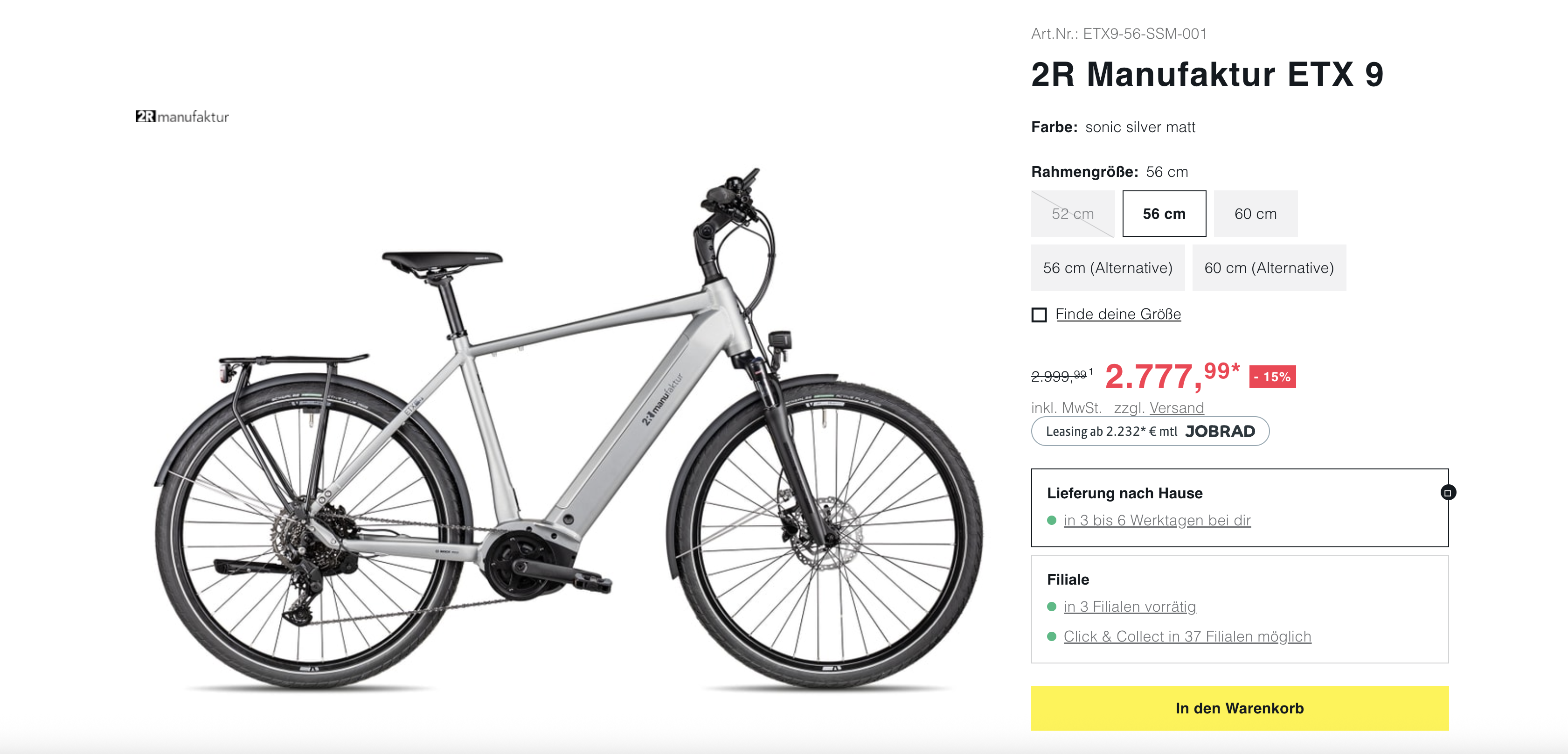
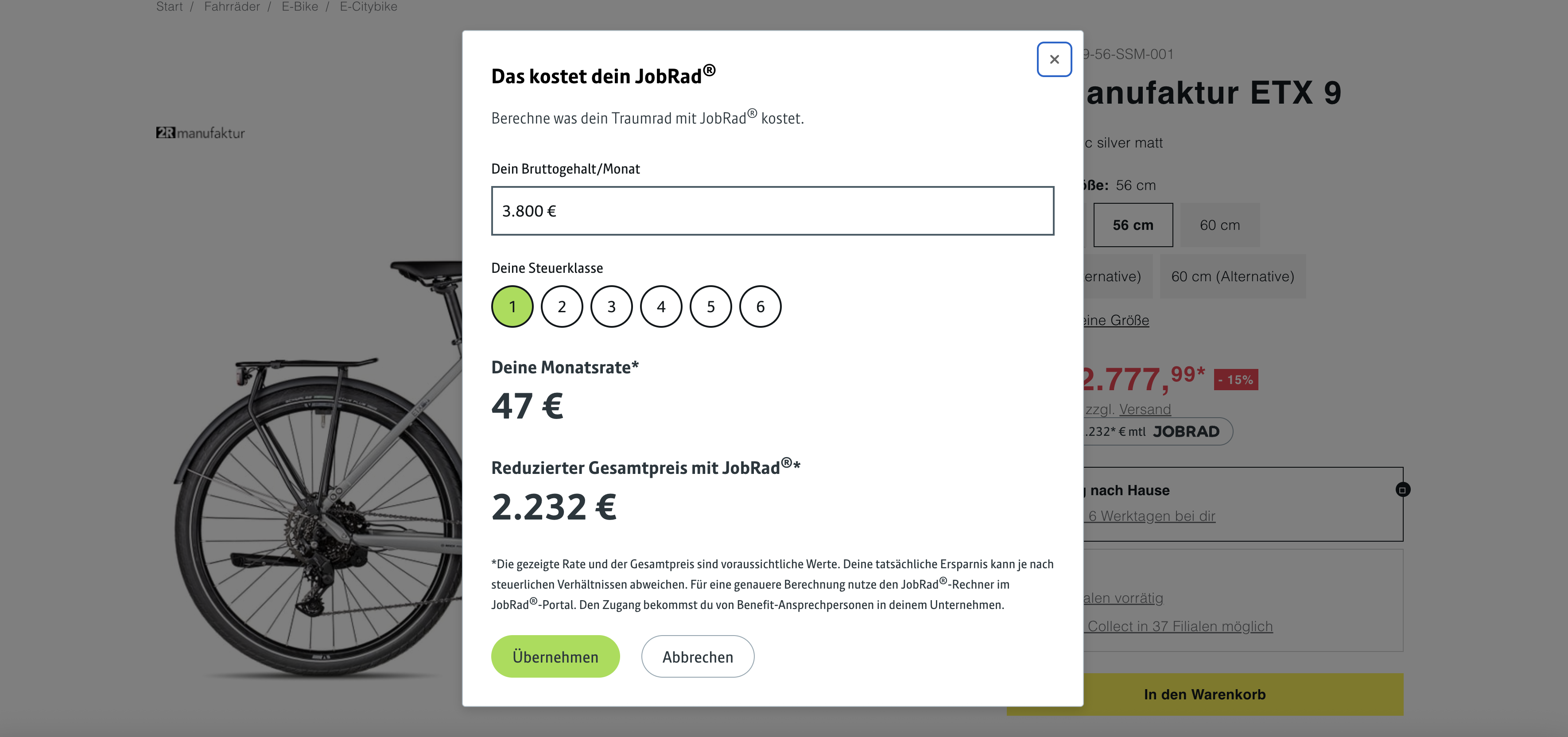
Live Demo
A live, fully functional example of the JobRad® Preis-Widget.
Alternative link style:
Implementation
- Add the following script to your HTML (before
</body>):
<script type="module" src="https://jobrad-price-widget.svc.jobrad.org/staticfiles/latest/jobrad-price-widget.js"></script>
- Insert the widget tag where you want the leasing price to appear:
<jobrad-price-widget
    data-actual-price="3999"
    data-uvp-price="4299"
    data-name="E-Bike Modell XYZ"
    data-brand="Fahrradmarke"
    data-product-id="EB123"
    data-category="E-Bike">
</jobrad-price-widget>
Configuration Options
| Attribute | Type | Required | Default | Description |
|---|---|---|---|---|
| data-actual-price | number | 3000 | The actual/current price of the bicycle | |
| data-name | string | - | The product name/title (for tracking purposes) | |
| data-brand | string | - | The brand of the bicycle (for tracking purposes) | |
| data-product-id | string | - | Unique product ID (for tracking purposes) | |
| data-category | string | - | Product category (e.g., “e-bike,” “gravel bike,” “city bike”) | |
| data-uvp-price | number | 3000 | The recommended retail price (UVP) | |
| data-display-mode | string | total | Display mode for the button text | |
| data-lang | string | de | Widget language: "de", "en", or "auto" | |
| data-variant | string | button | Visual representation: "button" or "link" |
⚠️ Important Notice: The attributes data-actual-price, data-uvp-price, data-name, data-brand, data-product-id, and data-category are mandatory. The widget will not be displayed if these attributes are missing.
Display Mode Options
"total"(default): Displays "Leasing from X €* with JobRad®" (total price with JobRad®)"monthly": Displays "Leasing from X €* per month with JobRad®" (monthly rate)
Language Options (data-lang)
The widget supports multiple languages via the data-lang attribute:
| Value | Description |
|---|---|
"de" | German widget (default) |
"en" | English widget (British English) |
"auto" | Automatic detection based on browser settings |
Widget Variants (data-variant)
The widget supports two visual styles:
"button"(default): Prominent button display, recommended for product pages"link": Subtle text link, ideal for inline integration or space-constrained layouts
Configuration Examples
<!-- Minimal configuration (all required attributes) -->
<jobrad-price-widget
    data-actual-price="2500"
    data-uvp-price="2600"
    data-name="City Bike Classic"
    data-brand="BikeBrand"
    data-product-id="CITY-001"
    data-category="Bicycle">
</jobrad-price-widget>

<!-- Full configuration with button variant and German language -->
<jobrad-price-widget
    data-actual-price="3999"
    data-uvp-price="4299"
    data-display-mode="total"
    data-variant="button"
    data-lang="de"
    data-name="E-Bike Premium"
    data-brand="ElektroRad GmbH"
    data-product-id="EBIKE-PRO-2024"
    data-category="E-Bike">
</jobrad-price-widget>

<!-- Link variant for subtle integration -->
<jobrad-price-widget
    data-actual-price="2799"
    data-uvp-price="2999"
    data-display-mode="monthly"
    data-variant="link"
    data-name="E-Bike City"
    data-brand="UrbanCycles"
    data-product-id="CITY-E-2024"
    data-category="E-Bike">
</jobrad-price-widget>

<!-- Example with English language -->
<jobrad-price-widget
    data-actual-price="1200"
    data-uvp-price="1200"
    data-lang="en"
    data-name="Trekking Bike Comfort"
    data-brand="TrekkingBikes"
    data-product-id="TREK-COM-001"
    data-category="Trekking Bike">
</jobrad-price-widget>

<!-- Example with automatic language detection -->
<jobrad-price-widget
    data-actual-price="3499"
    data-uvp-price="3699"
    data-display-mode="monthly"
    data-lang="auto"
    data-name="Mountain Bike Pro"
    data-brand="MTB Brand"
    data-product-id="MTB-PRO-001"
    data-category="Mountain Bike">
</jobrad-price-widget>
Validation and Error Handling
Attribute Validation
When loading, the widget performs validation of the required attributes:
- Missing attributes: If any of the required attributes (
data-actual-price,data-name,data-brand,data-product-id,data-category) are missing, the widget will not render and an error message will be shown in the developer console, listing the missing attributes. - Invalid prices:
data-actual-priceanddata-uvp-pricemust contain a positive number. - Empty values: Required string attributes must not be empty.
- Invalid language: If
data-langcontains an invalid value (e.g.,"fr"), a warning is displayed in the console and the default language (German) is used. Valid values are:"de","en","auto".
Error Messages
For missing or invalid attributes, the widget displays a user-friendly error message in the developer console. This helps during development and quality assurance of the integration.
Debugging Tips
- Check in the browser developer tools that all required attributes are set
- Ensure that price attributes contain numeric values
- Use meaningful values for tracking attributes (name, brand, product-id, category)
How It Works
1. Widget Architecture
- Web Component: Uses the custom HTML element
<jobrad-price-widget> - Shadow DOM: Encapsulates CSS to avoid conflicts with the embedding website
- Responsive: CSS modules with a mobile-first approach
2. Calculation Logic
- Calculates monthly leasing rates based on gross salary
- Applies tax classes (tax classes 1–6)
- Calculates total cost savings with JobRad® benefits
3. User Interaction Flow
- Button display: Shows calculated monthly rate or total price
- Open dialog: Click opens modal with detailed calculator
- User input: User enters salary (gross salary) and tax class
- Real-time calculation: Updates results with 550 ms debounce
- Session persistence: Saves inputs for future use during the same browser session
Storage Mechanism
Session Storage Keys
The widget uses the browser’s session storage to remember user inputs:
| Key | Purpose | Data type |
|---|---|---|
| JOBRAD_PRICE_WIDGET_GEHALT_STORAGE_KEY | Stores monthly gross salary | number |
| JOBRAD_PRICE_WIDGET_STEUERKLASSE_STORAGE_KEY | Stores selected tax class | number (1–6) |
Storage Behavior
- Persistence: Data remains available within the same session
- Cross-widget synchronization: Changes in one widget immediately update other instances via custom events
- Data privacy: Data is stored locally only, never sent to external servers
Storage Limits
- Salary range: 197 EUR – 20,000 EUR per month
- Tax classes: 1, 2, 3, 4, 5, 6 (German tax system)
- Default values: Salary: 3800, Tax class: 1
Technical Requirements
Browser Compatibility
- Modern browsers: Chrome 88+, Firefox 85+, Safari 14+, Edge 88+
- Web Components: Requires native Custom Elements support
- JavaScript: Uses ES2020+ features
- CSS: Uses CSS Custom Properties and CSS Modules
Widget Lifecycle
- Attribute validation: Performed when the component loads (
connectedCallback) - Error handling: Displays user-friendly error messages for invalid attributes in the developer console
- Reactive updates: Reacts to attribute changes at runtime
- Memory management: Automatic cleanup when the component is removed
Recommended Values for Tracking Attributes
data-name: Full product name as displayed in the shopdata-brand: Manufacturer’s brand namedata-product-id: SKU, article number, or internal product IDdata-category: Categorization such as "E-bike", "Bicycle", "Trekking bike", "Mountain bike", etc.
Content Security Policy (CSP) Adjustments
Required CSP Directives
The JobRad® Preis-Widget loads external resources and executes JavaScript.
If your website uses Content Security Policy (CSP) headers, the following directives must be adjusted:
script-src
script-src 'self' https://jobrad-price-widget.svc.jobrad.org;
img-src
img-src 'self' https://jobrad-price-widget.svc.jobrad.org;
CSP Configuration
Option 1: Meta tag in HTML
<meta http-equiv="Content-Security-Policy"
      content="default-src 'self';
               script-src 'self' https://jobrad-price-widget.svc.jobrad.org;
               img-src 'self' https://jobrad-price-widget.svc.jobrad.org data:;
               style-src 'self' 'unsafe-inline';">
Option 2: HTTP Response Header (recommended)
Content-Security-Policy: default-src 'self'; script-src 'self' https://jobrad-price-widget.svc.jobrad.org; img-src 'self' https://jobrad-price-widget.svc.jobrad.org data:; style-src 'self' 'unsafe-inline'
Important Notice: Without the correct CSP configuration, the widget will not function and errors will appear in the browser console.
Tracking and Analytics
Tracking Pixel
The widget uses an integrated tracking pixel to collect usage statistics. The following data is transmitted:
- Widget events: Widget load, dialog openings, calculations
- Product data: Information provided via widget attributes (name, brand, product ID, category, bicycle price)
- Technical data: Browser information, timestamps
- No personal data: Salary inputs or other sensitive user data are NOT transmitted
Data Protection
- Session-local data: User inputs (salary, tax class) remain in the browser session storage
- Anonymized transmission: Only aggregated, non-personal statistics are collected
- GDPR-compliant: No personal data is collected without consent
Integration Best Practices
Placement Guidelines
- Product pages: Place near price information and purchase buttons
- Mobile: Ensure sufficient touch target size (at least 44px)